
ContentsView article sections
UPDATE: The 1330 App and SOS button no longer exist as of 2026. However, we are leaving this blog post live as historical information documenting the relationship between 1330 and 119.
As some of you already know, 1330 Travel Hotline developed an app to support the international community and their daily queries about resources in South Korea. You can read more about the aid and services the app offers in South of Seoul’s recent blog. This blog will focus on one specific function of the 1330 Travel Hotline App, the SOS Button.

What is the 1330 Travel Hotline SOS Button?
The 1330 SOS button is channel that connects international residents and travelers to an interpreter who can assist with 119 Emergency Rescue Service calls 24 hours a day 7 days a week. As with the general 1330 app functions, the SOS button offers support in a a variety of languages including Korean, English, Japanese, Chinese, Russian, Vietnamese, Thai, and Malay.
There is one important thing to note about the 1330 SOS button: It does NOT connect you directly to 119. Instead, you use the 1330 SOS button, you get connected to an interpreter who will assist you with your emergency call.
For a faster response, it may be better to call 119 directly. However, be aware that you will need to request an interpreter and wait to be connected in this case. Some individuals have found it difficult to communicate to emergency responders that they need a specific language service. Therefore, having an interpretation service such as 1330 at the ready could save precious time in an emergency.
That all said, we have (fortunately) not had the opportunity to test the 1330 SOS button. So, please make your best judgement when deciding whether to use the 1330 SOS service versus calling 119 directly.
Fun Fact: When you call 119 directly and ask for a language interpreter, the emergency responder will either connect you with a 1330 representative or another language service. More information on direct 119 calls coming in a future blog.
How do I use the 1330 Travel Hotline SOS Button?

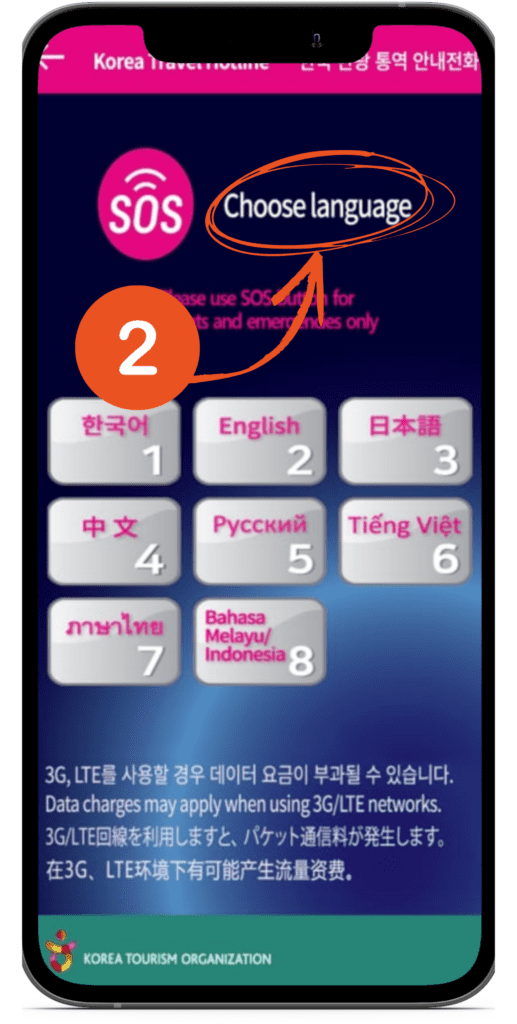

The 1330 SOS button is simple to use. First, open the 1330 Travel Hotline App. Next, click the SOS Emergency Call button on the bottom of the screen. Finally, select your preferred language. Selecting the language button begins your call.
Once connected with an 1330 SOS interpreter, let them know that you have an emergency. Your interpreter will take the necessary steps to connect with an emergency responder and assist with your situation.
You should only use the SOS button for emergencies! The 1330 SOS team will have limited capacity to help those truly in need if their lines get backed up with non-emergency calls. So, please be conscientious when utilizing this service.
The 1330 Travel Hotline is such an amazing resource to help foreigners navigate Korea. If you haven’t downloaded yet, it is available on android and iOS.
Article Information & History
Article History
No formal audit has been recorded for this article under the current South of Seoul editorial process.
Before You Act
South of Seoul articles document information available at a particular point in time. Prices, hours, services, policies, procedures, laws, eligibility requirements, transportation, contact details, and local conditions can change.
Use this article as a research starting point and confirm important details using current official resources, direct contact, Naver Maps, Kakao Map, and other reliable sources when appropriate.
For consequential immigration, legal, medical, or financial decisions, confirm current requirements with the relevant official authority or an appropriately qualified professional.
See something that needs updating?
Help us keep practical information useful. Reader reports are reviewed by our editorial team and do not automatically change this article.


 Jetta Allen
 South of Seoul